
How to Create an Idle Screen
What is an Idle Screen?
An idle screen on a hotel tablet is the default display shown when the tablet is not actively being used by a guest.
The idle screen is a visually engaging, low-interaction screen that appears after a period of inactivity, serving as both a screensaver and a subtle communication tool.

How to Create an Idle Screen
- Open HCN CMS.
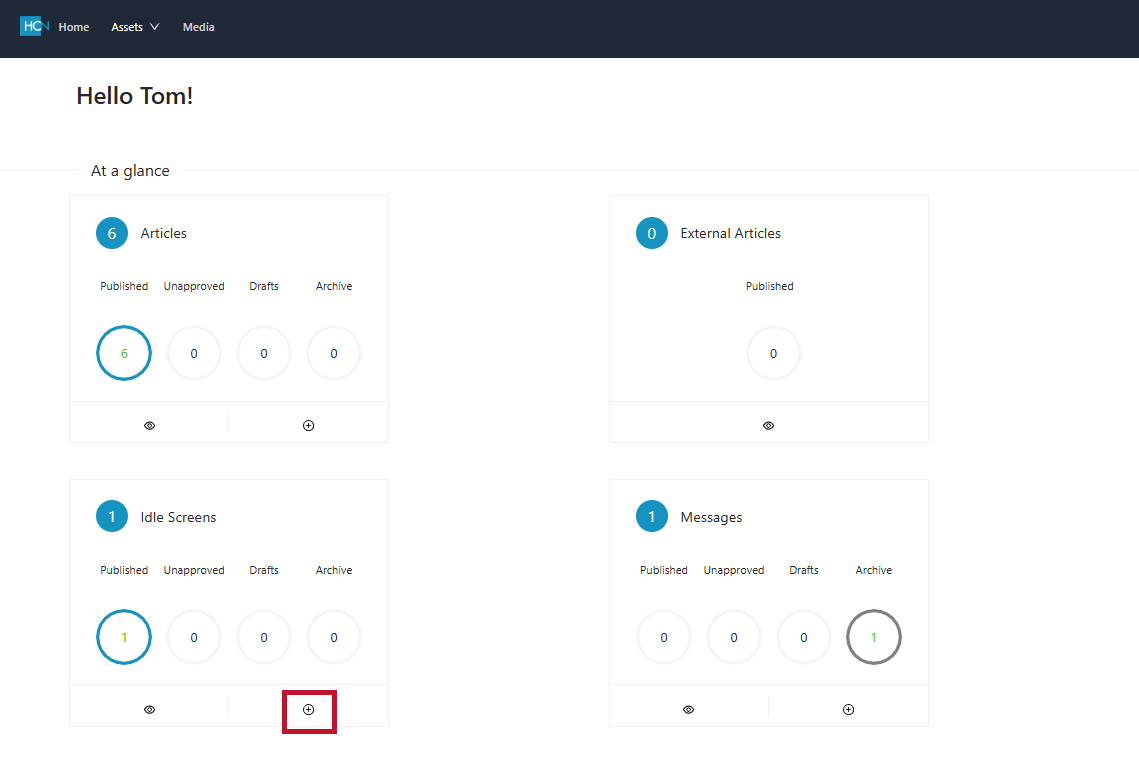
- Press the plus (+) icon on Idle Screens to create a new Idle Screen.
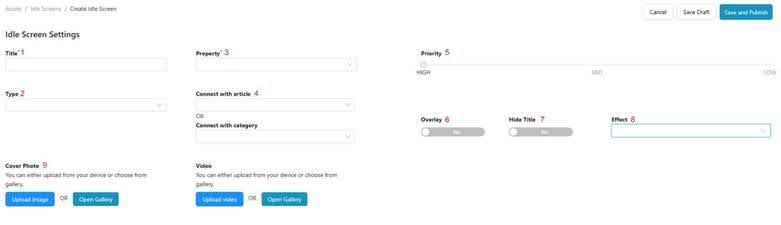
Configuring the Idle Screen
- Message Title
The primary title of the Idle Screen - Type
A drop down to select the style of message from Idle Screen / Welcome Screen. - Property
Select hotel from drop down. The only option will be the current hotel. - Connect With Article / Category
A drop down to specify an article or Category to link the Idle Screen to if any. - Priority
The position in the current selection of Idle Screens where your new content should appear. - Overlay
Not Currently Used - Hide Title
Not Currently Used - Effect
A drop down selection of a visual effect regarding the motion of the Idle Slide upon initial display. - Cover Photo
Your created Idle Slide is uploaded here. Utilize the Ad Centric Template for all Ad Centric Hotels, and the Welcome Screen Template for all Ad Free Hotel Idle Screens. The Welcome Screen Template will be used for both Ad Centric and Ad Free Welcome Screens.
Publish the Idle Screen
- Select Save and Publish.
- No additional steps are necessary to publish the Idle Screen.